Connect with thousands of verified singles from around the world on the #1 international dating site. With over 20 years of experience and over 10,000 success stories, we're dedicated to making your dreams come true.

Welcome to Dream Singles
With over 20 years of experience and thousands of successful relationships built across borders, Dream Singles is dedicated to helping you find true love. We proudly connect verified singles from around the globe, making your dream of an international partner a reality.

Safe & Secure Connections
Your safety is our top priority. Dream Singles provides a best-in-class secure environment, backed by TrustedSite certifications, Google Safe Browsing verification, and industry-standard data protection protocols. All accounts are rigorously verified, ensuring a trustworthy dating experience.

Real Success, Real Love
Experience the journey to love firsthand with over 10,000 success stories and counting. Dream Singles has proudly created more successful relationships than any other international dating site, proving that connecting with your dream partner has never been easier.

Premium Features
Dream Singles is renowned for its cutting-edge communication tools and user-friendly features. Whether you prefer live video chat, engaging voice chat, or instant text messaging, our platform offers everything you need to build meaningful and lasting relationships.
Features
Discover What Makes Singles #1
Unlock unparalleled communication and connection with our cutting-edge features, designed to help you find true love around the world.
- Live Video Chat
- Advanced Profile Searching
- Online Now Indicator
- Voice Chat
- Success Stories
- Serious Dater Program
Frequently Asked Questions
Interested in getting started with Dream Singles? Here are some of the frequently asked questions that can help get you begin your journey.

Interested in getting started with Dream Singles? Here are some of the frequently asked questions that can help get you begin your journey.
What is Dream Singles?
Dream Singles is the #1 international dating site, connecting singles from over 200 countries for over 20 years. We’ve created thousands of successful relationships and were awarded “Best Niche Dating Site” in 2015.
How safe and secure is Dream Singles?
Extremely safe! We use TrustedSite certifications, Google Safe Browsing, and industry-standard security protocols. All accounts are verified, and our site is constantly monitored for threats to ensure your worry-free experience.
Are there many singles available on Dream Singles?
Yes, a massive community! We have a 7:1 women to men ratio, over 100,000 new signups/month, 15,000+ active members daily, and 2 million monthly visitors from 200+ countries.
How do I find a match on Dream Singles?
Use our Advanced Profile Searching with filters like age, location, and appearance to find your ideal match. Then connect via instant messaging, voice, or live video chat!
Frequently Asked Questions
Interested in getting started with Dream Singles? Here are some of the frequently asked questions that can help get you begin your journey.
What is Dream Singles?
Dream Singles is the #1 international dating site, connecting singles from over 200 countries for over 20 years. We’ve created thousands of successful relationships and were awarded “Best Niche Dating Site” in 2015.
How safe and secure is Dream Singles?
Extremely safe! We use TrustedSite certifications, Google Safe Browsing, and industry-standard security protocols. All accounts are verified, and our site is constantly monitored for threats to ensure your worry-free experience.
Are there many singles available on Dream Singles?
Yes, a massive community! We have a 7:1 women to men ratio, over 100,000 new signups/month, 15,000+ active members daily, and 2 million monthly visitors from 200+ countries.
How do I find a match on Dream Singles?
Use our Advanced Profile Searching with filters like age, location, and appearance to find your ideal match. Then connect via instant messaging, voice, or live video chat!
Our Success Speaks for itself



What We're Known For

7:1 Women to Men

1000s of Success Stories

20+ Years in Business

Live Video Chat
Dream Singles Testimonial
Don't take our word for it - here's what our clients say:
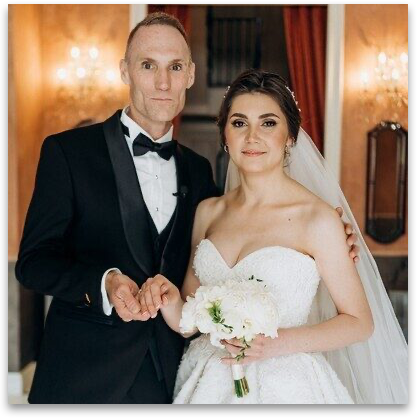

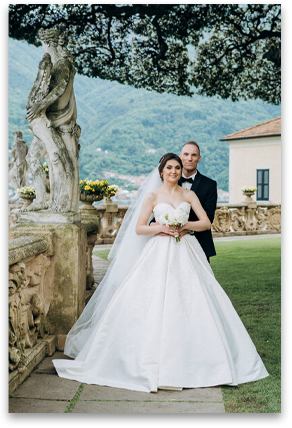
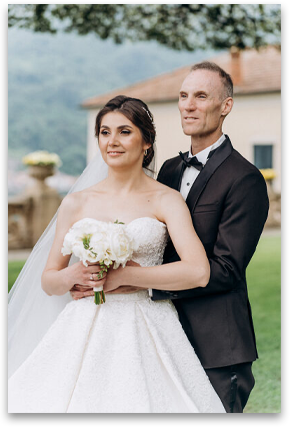
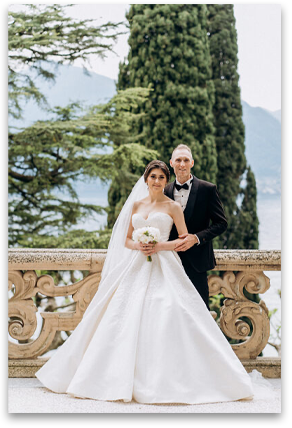
When thinking about a wedding, the only word that comes to mind is a "fairytale". I can honestly say that this word best describes our special day. I have always had a dream to visit Italy. I have no idea how Scottie managed to arrange everything in just a month and make my dream come true. My only "duty' was to take a few days off from work and prepare my international passport, everything else was a surprise properly arranged by Scottie.
So, just imagine - my sister, my little niece and I get on a plane to fly to Milan where we meet with Scott. First day we just walk around enjoying our time together and somehow "quite by accident" we get to the Ukrainian Embassy and then to the City Hall.. I was absolutely sure we would just register the marriage and that is it. How wrong I was.
After completing the paperwork, our next stop was a boutique of wedding dresses and then, I realized the fairy tale begins.. Beautiful little hotel room overlooking Lake Como, I am sipping my orange juice enjoying the view.. There is a knock on the door and here are the make up artist and hairstylist, and here are the photographer and video maker (what a surprise all these people are from Ukraine), another knock on the door - flower delivery and the bunch of beautiful white peonies is now in my hands, I go downstairs and see my Scott wearing the most beautiful tuxedo, his hands are shaking, eyes looking at me and he whispers 'I think I can make you happy for a long, long time and I love you so much' .
Then our unforgettable boat trip along Como Lake, our wedding photoshoot in the pearl of Lake Como - Villa Balbianello which was opened just for the two of us that day, official open-air registration, our wedding ceremony and the exchange of wedding vows, a small reception just for the dearest people, a lot of sweet memories, bright emotions, our first wedding kiss, our first wedding dance, our first... our first EVERYTHING..
It is something I am sure we will cherish forever. I still have no idea how it all happened. I have no idea what good things I did in my life to get through a day like this, but I can honestly say that I felt like a real princess and this is what I will cherish forever. This is what I wish every single girl and man who is still searching to feel in their lives.
First of all, I want to say thank you to my dear Scottie for creating such a beautiful wedding. That was definitely the first but not the last our happy moment. Thank you Dream Singles site, my agency and my family for everything they have done for our happiness!!!"